Separating Auth Services With Business Services Instances
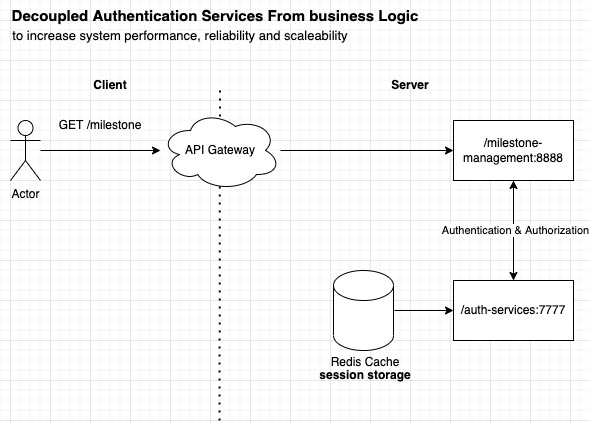
 Decoupling authentication and authorization services with business logic services instances
Authentication and authorization services often to be developed on different instances (not just different folder, but on different process id/ports) to avoid resource(CPU/memory/IO) consumption overhead on business services. For example, in the case on milestone management platform, the core milestone management API instances should only focus handling the business logic instead of executing authentication validation.
— If authentication and authorization is clumped in same business services, the available server resources will be shared for both executing business logic and authentication+authorization task.
All authentication related task will be centralized on dedicated authentication services including following key task:
- Login using username and password
- Login user 3rd party credentials such as gmail with Oauth2 standard.
- Generating Access Token
- Generating Refresh Token
- Validate JWT (Json Web Token)
- Invalidating (revoke) the JWT
- User Onboarding using username and password method
- User Onboarding using 3rd party credentials
- Grant user role
- Grant user Permissions (authorization)
those eight use cases are common to be clumped together in authentication services. Note that the Oauth2 based authorization services (granting the user role and perm) will also be on same services with authentication.
Layered Architecture BE Services Boilerplate
Layered architecture is a concept of segregating different layer of code depending on each functionality. In the context of HTTP REST API The layer are often defined in following categories:
- Controller layer - To handle (validate request header, request body) incoming HTTP request
- Service Layer - To contain business logic. On this cases is the 10 task of authentication and auhtorization business logic.
- Model Layer - Contain the business entity/object (on this case is any entity that directly related with user and role)
- DAO Layer (data access object) - To initate and manage database access
- DTO Layer (data transfer object) - To model request and response object
- Util Layer - To handle all utlity function such as data/time conversion, etc
- Assets layer - To store any certificates/images/css that needed by auth services
- Config layer - to store any configuration files (constant data). Example: database connection string
- Integration Layer - to store any non database releated integration service. Example: integrate with google firebase auth.
ExpressJS based Auth Services Boilerplate Using Layered Architecture
Below are the boilerplate structure for authentication and authorization services using NodeJS, ExpressJS, JWT and Oauth2.
/auth-service
|--/src
|		|--/route/
|					|--/validation/
|		|--/middleware/
|		|--/model/
|					|--/DTO/
|		|--/helper/
|		|--/config/
|		|--/DAO/
|		|--/integration/
|		|--/service/
|		app.ts
package.json
tsconfig.json
Route folder will hold all available routes within the auth services. Any middleware (for example: JSON body parser, some security check or request.body validator) will be stored inside /middleware folder. However, the incoming http request validation class/function will not be written under /services, it will be decoupled from the business logic and stored inside the /validation folder.
All business entity that related with authentication or authorization such as User, Role, UserAuthentication, Authentication will have its class inside model folder.
HTTP request model and HTTP responses class for both external and internal request will be defined inside the /model/DTO folder. Database (including redis if needed) query and connection management will go inside the DAO. All integration code to 3rd party credentials authentication such as google firebase auth will be stored inside integration folder.
Then finally, everyt authentication or authorization business process will written inside services folder.
Note: helper folder will be used to store any utility function like datetime conversion. All configuration such as database connection string will be stored inside “config” folder.
No Dedicated Folder for Unit Test
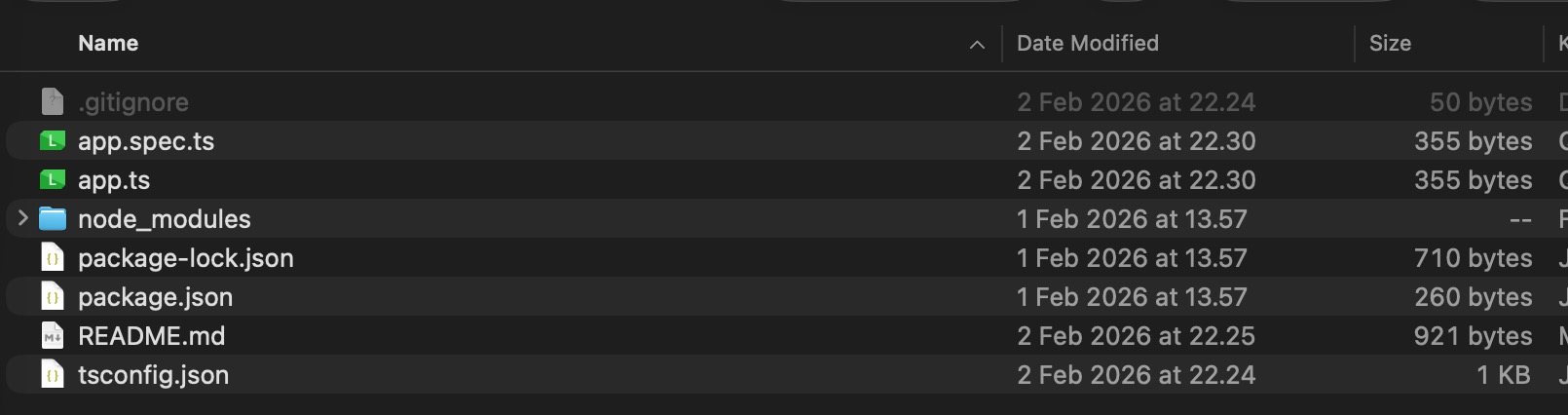 Each typescript .ts file must have corresponding test file
Having separate folder specifically to hold unit test script is generally not recommended as we may miss out some files especially if the project has tons of file. It is recommended to have the unit test file on the same source code folder. Each .ts file should have the corresponding .spec.ts file