The Importance of Distributed Computing in Modern Software Engineering landscape.
Demand on technology adoption (B2C) for both consumer or business to business (B2B) is raising in the last five year.
Most of gen-Z (people who born after 1995) and gen alpha (born after 2012) has been exposed to technology ever since they were kids. They have one thing in common: rapid technology adoption.
For example, most of gen X and gen Y are prefer to use built in calendar application on their phone or even use physical calendar to plan & schedule their activities while gen Z and gen alpha are exploring fancy apps for daily schedule on the market (app store, web or playstore).
Those rapid technology adoption by gen Z and gen alpha increasing the demand of a scaleable SaaS platform as they should serve the majority population (gen Z and gen alpha are making up 70% of world population)
— scalable saas can only be achieved with distributed computing as the true monolithic computing has limited capacity.
What is Distributed Computing?
Distributed computing is a system architecture where single task to achieve business objective will be distributed over several different servers through computer network.
Simple distributed computing using NodeJS
NodeJS can distribute the task into multiple services that called as a worker within a node cluster. The number of spawned node cluster depending on the CPU core of the server.
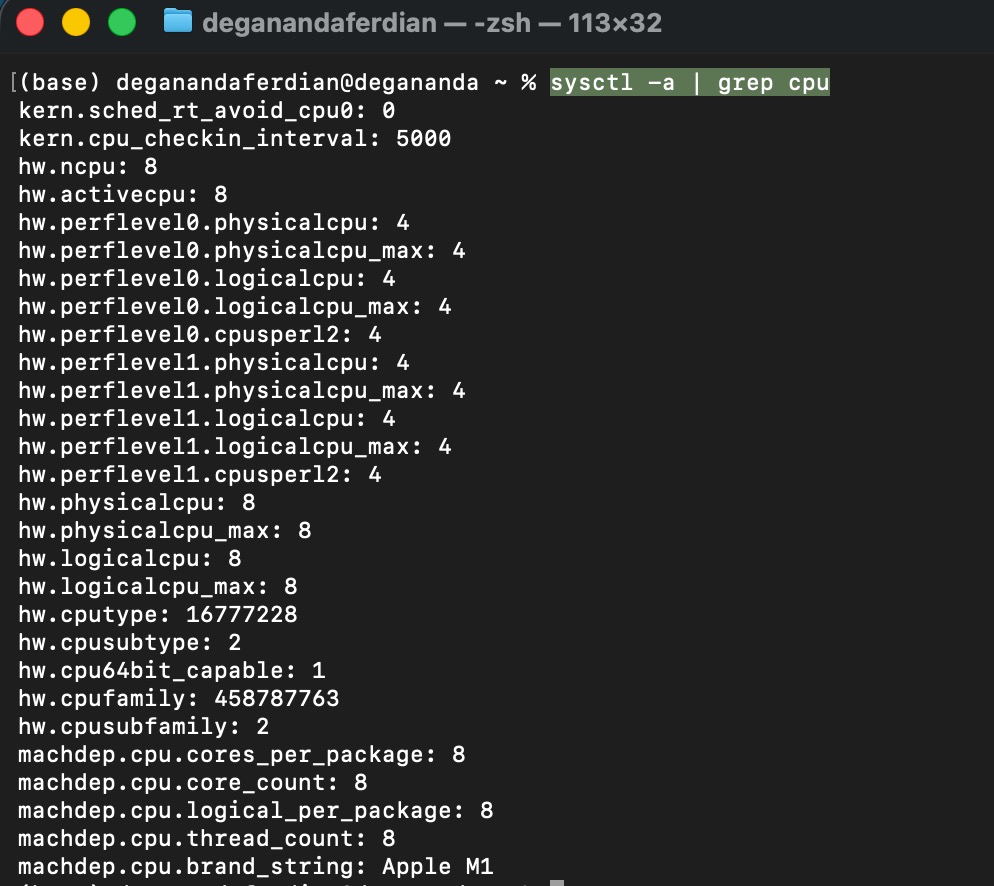
For example, Apple silicon M1 processor for macbook air 2020 has total of 8 CPU Core.
if you’re on apple mac silicon laptop execute following command to get the CPU core of the laptop.
sysctl -a | grep cpu
it will shown the cpu specs as shown below
transaction flow per single request on single cluster
- get current timestamp in integer format
- randomize 12 digit number
- randomize operator (1. plus [+] 2. minus [-] 3. times [*])
- add/substract/multiply the timestamp(integer) with 12 digit randomized number from step 2
- display on console log
below the nodeJS code snippet to execute these operations.
const currentTimestamp = Date.now();

function randomTwelveDigitNumber() {
    const min = 100000000000;
    const max = 999999999999;
    return parseInt(Math.floor(Math.random() * (max - min + 1)) + min);
}

function calculate(timestampInt, randomizedDigit) {
    const min = 1;
    const max = 3;
    const rand = Math.floor(Math.random() * (max - min + 1)) + min;
    if (rand == 1) {
        return parseInt(timestampInt) + parseInt(randomizedDigit);
    } else if (rand == 2) {
        return parseInt(timestampInt) - parseInt(randomizedDigit);
    } else {
        return parseInt(timestampInt) * parseInt(randomizedDigit);

    }
}

console.log(calculate(currentTimestamp, randomTwelveDigitNumber()));
next is to expose an HTTP listener and attach those function under an API because apache benchmark is tools to load test a HTTP endpoint.
there are some HTTP based APIs framework which available on nodejs such as Express (most popular and widely used) and HAPI.
install express on the project directory
npm install express --save
intialize express and expose an API which perform steps number 1 till 5.
const express = require('express')
const app = express()
const port = 3000

function randomTwelveDigitNumber() {
    const min = 100000000000;
    const max = 999999999999;
    return parseInt(Math.floor(Math.random() * (max - min + 1)) + min);
}

function calculate(timestampInt, randomizedDigit) {
    const min = 1;
    const max = 3;
    const rand = Math.floor(Math.random() * (max - min + 1)) + min;
    if (rand == 1) {
        return parseInt(timestampInt) + parseInt(randomizedDigit);
    } else if (rand == 2) {
        return parseInt(timestampInt) - parseInt(randomizedDigit);
    } else {
        return parseInt(timestampInt) * parseInt(randomizedDigit);

    }
}

app.get('/', (req, res) => {
    const currentTimestamp = Date.now();
    return res.json({ "number": calculate(currentTimestamp, randomTwelveDigitNumber()) });
})

app.listen(port, () => {
    console.log(`API Exposes on port: ${port}`)
})
Now the exposed HTTP GET endpoint which perform numerical computations is ready to undergo HTTP performance test using apache AB.
Benchmark Tools
Benchmark tools is needed in order to measure, capture and record API performances metrics including success/failure rate, average latency and throughput.
There are two major leading API performance test tools on the market
- Apache AB - CLI(command line interface) based high level load test with limited customization (eg: adding validation on different request payload, get payload by reading csv, etc)
- Apache Jmeter - GUI(graphical user interface) based low level load test with fully customized request parameter (timer, read from csv, chaining multiple API, etc) and dynamic responses validation (built in assertion method)
Some organization use apache jmeter not only for performance test, but also used for functional testing (limited to backend and web-based UI) automation to reduce the test script development time (single script to measure performance and capture functional correctness) due to the customizeability of apache jmeter (selenium script can be written on jmeter).
Mobile apps automated functional and performance test require specialized tools such as Katalon and Appium
The API performance will be benchmarked against various system load condition. There are three common performance test/benchmark scenario on software engineering practices such as:
- Stress Test: Benchmark the API by giving the API target TPS based on actual production TPS forecast for about 24 hours.
- Load Test: Shorter test duration (half or thirth of the stress test duration) but with higher throughput (usually is 150% from the stress test traffic TPS)
- Soak test: Stress test with longer duration (usually double of the original time) but use same TPS.
note: TPS is transaction per second
It is recommended to keep the measurement granularity in “second” instead of per minutes based in order to get the most detailed performance benchmark result because the bottle neck can occur at specific “second” of the execution timeframe.
Installing Apache AB to measure API performance
On this article scenario, apache AB is used because the focus is to test the overall vertical scaling capability of the nodeJS based API instead of testing specific business logic.
Depending on machine OS, below are the command to install apache ab (apache benchmark)
Mac OS - via brew
brew install httpd
Debian Bases (eg: ubuntu)
sudo apt-get update
sudo apt-get install apache2-utils
wait until the installation process is completed.
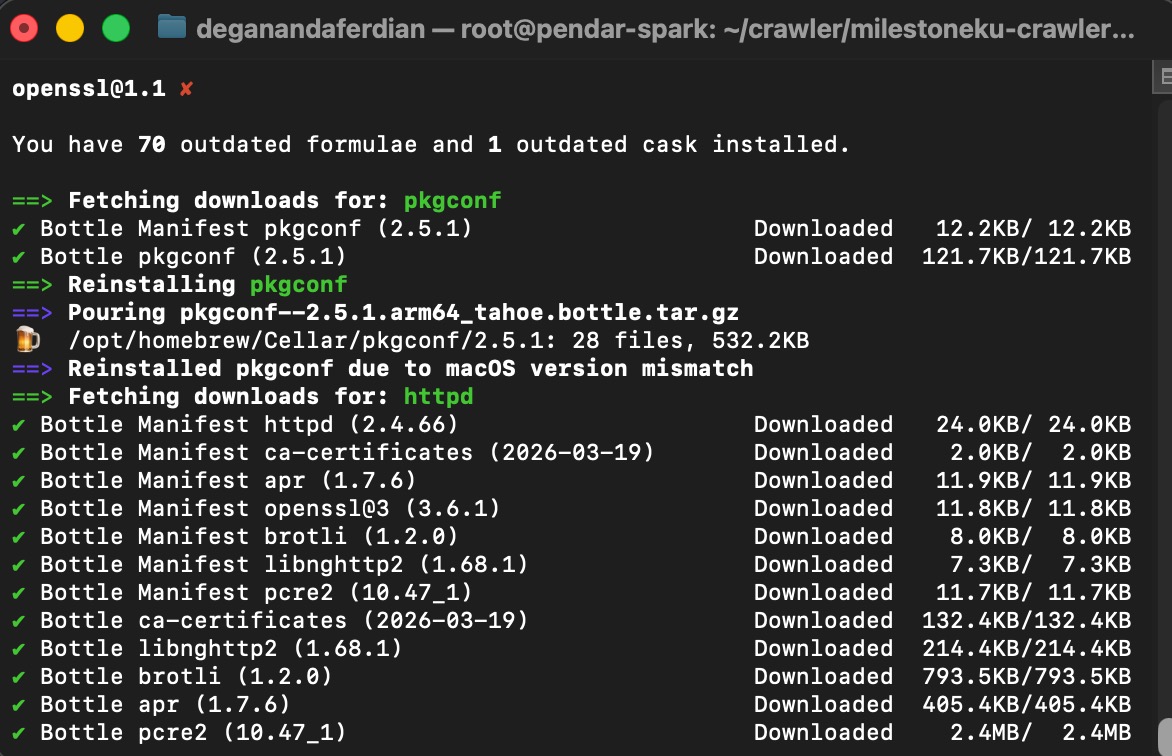 Brew will automatically update old packages before installing ab or httpd
note: for Mac OS users, brew install will automatically renew and update old brew packages, hence it will take sometime until the apache benchmark is completely installed.
validate whether apache AB is successfully installed by checking the apache AB cli tools version on the console by executing following command
ab -V
it should return the apache ab version installed on the systems as shown below
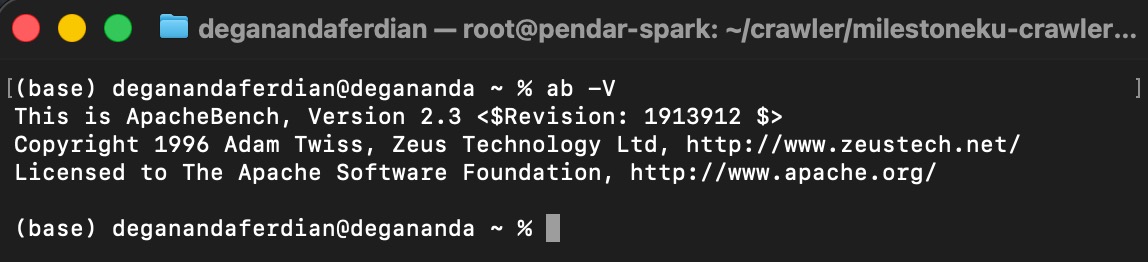 Checking AB version on console to ensure AB is installed properly
Run the HTTP API Server
Run the express server that will expose the to be tested endpoint
node index.js
ensure the port is reachable using netcat or curl or telnet
telnet
telnet localhost 3000
curl
curl -v localhost 3000
netcat
nc -vz localhost 3000
note: replace 3000 with your server’s exposed port.
Execute the Performance Test for Non Cluster
below is the command to intiate 1K requests for 1 users using apache ab
ab -n 1000 -c 1 -l localhost:3000
replace 1000 with your desired target request and replace -c 1 with the number of target users.
-l parameter is required on current performance test cases to ensure apache benchmark wont flag the request as failed by accepting dynamic response size as the endpoint is returning different response for each request.
2 concurrent user with 3K requests
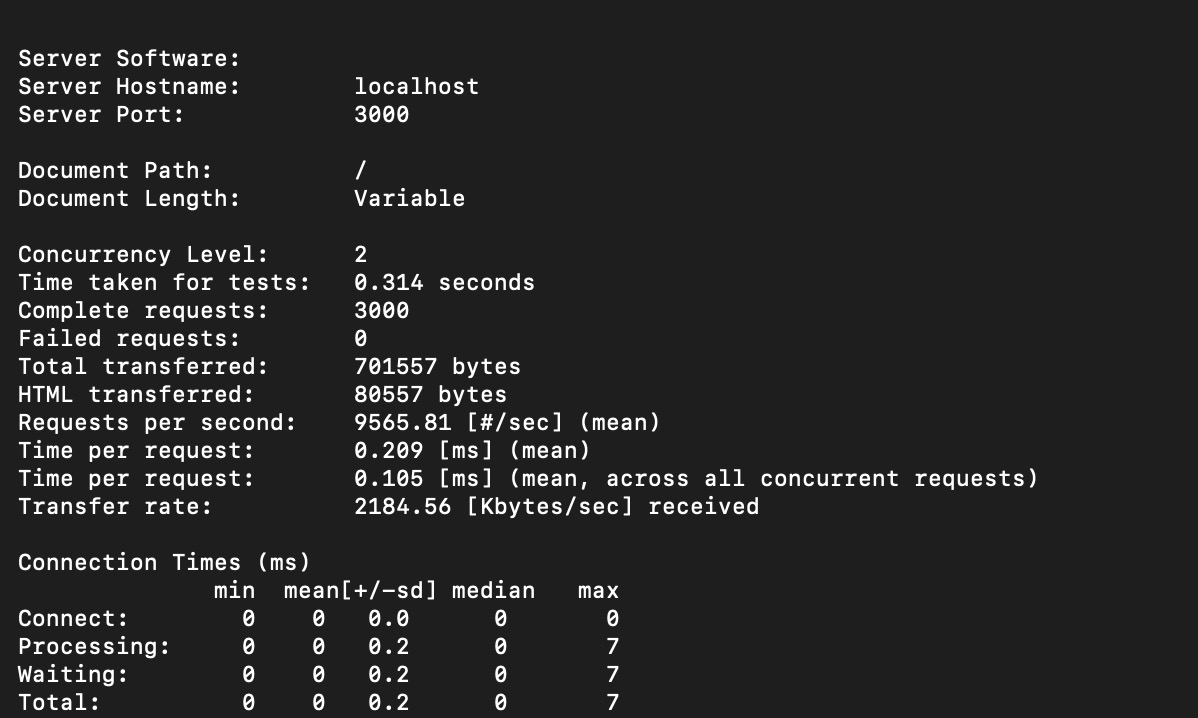 2 Concurrent user traffic test with apache benckmark
20 concurrent user with 3K requests
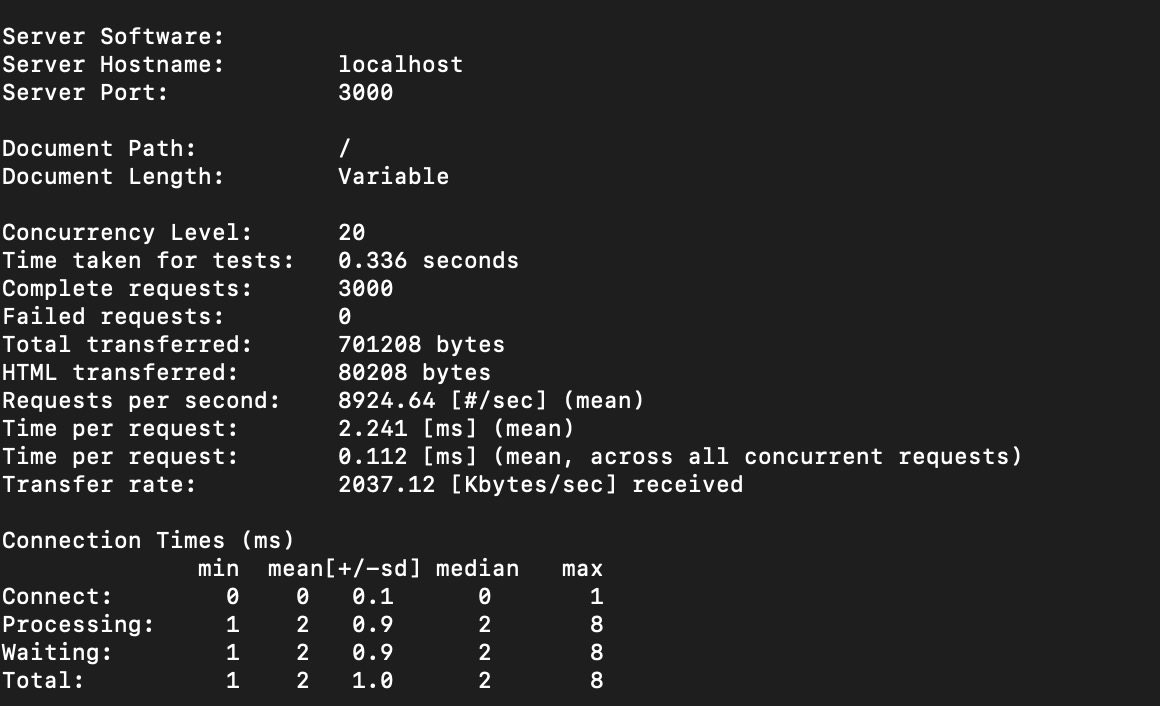 20 Concurrent user traffic test with apache benckmark
with more users making request, single core cluster performance started to decline. Time per request is drop from 0.2ms to 2.2 ms (11 times slower).
The Resolution: Vertical Scaling with Distributed Computing
By default, single threaded nodeJS v8 engine only utilizing single core of the CPU. The single threaded is really good for I/O operations such as network request (including HTTP requests). However, as the current test code only 1 CPU core it causes a bottleneck.
Before adjusting the code and adding cluster support to utilize multi CPU core for the I/O processing, we have to check the available CPU core on the machine/server.
Determine the number of available host CPU core by executing following command.
Check CPU core on mac
sysctl -n hw.ncpu
Current machines has 8 CPU cores as shown below
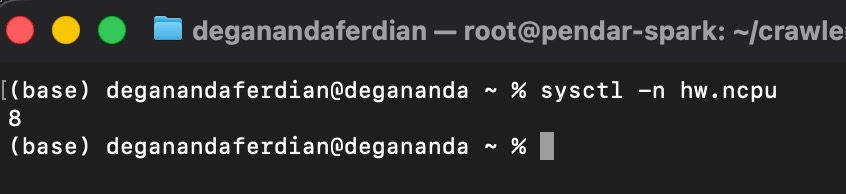 Available CPU core on the local machine
Check CPU core on debian based linux
lscpu
Adjusting the expressJS based API code to spawn multiple cluster. One cluster will use one CPU core.
const express = require('express')
const app = express()
const port = 3000
// Node Cluster
const cluster = require('node:cluster');
const numCPUs = require('node:os').availableParallelism();
const process = require('node:process');


function randomTwelveDigitNumber() {
    const min = 100000000000;
    const max = 999999999999;
    return parseInt(Math.floor(Math.random() * (max - min + 1)) + min);
}

function calculate(timestampInt, randomizedDigit) {
    const min = 1;
    const max = 3;
    const rand = Math.floor(Math.random() * (max - min + 1)) + min;
    if (rand == 1) {
        return parseInt(timestampInt) + parseInt(randomizedDigit);
    } else if (rand == 2) {
        return parseInt(timestampInt) - parseInt(randomizedDigit);
    } else {
        return parseInt(timestampInt) * parseInt(randomizedDigit);

    }
}

if (cluster.isPrimary) {
    for (let i = 0; i < numCPUs; i++) {
        cluster.fork();
    }
    cluster.on('exit', (worker) => {
        console.log(`worker on PID: ${worker.process.pid} died`);
    });
} else {
    app.get('/', (req, res) => {
        const currentTimestamp = Date.now();
        console.log(`requests processed by PID: ${process.pid}`)
        return res.status(200).json({ "number": calculate(currentTimestamp, randomTwelveDigitNumber()) });
    })

    app.listen(port, () => {
        console.log(`Worker on PID: ${process.pid} | API Exposes on port: ${port}`)
    })
}
start the clustered express http API server
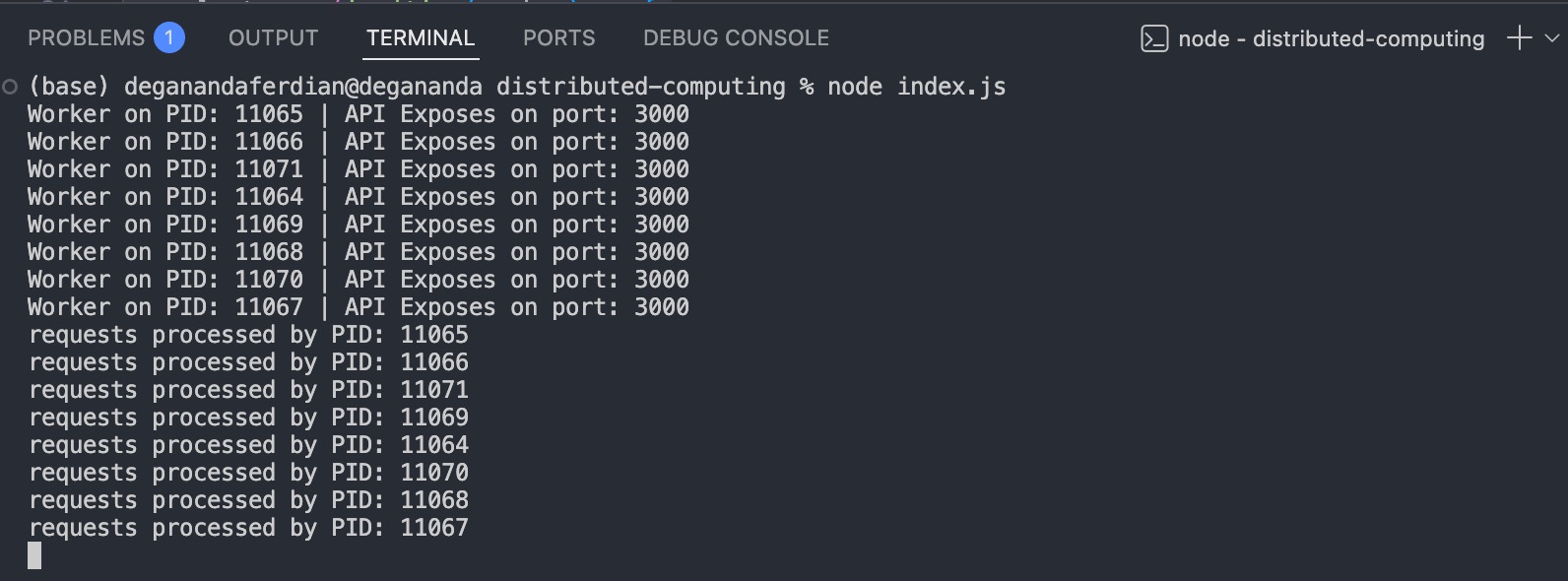
to ensure each worker is actually serving different request, use apache ab to sendout 8 requests with only one concurrent users.
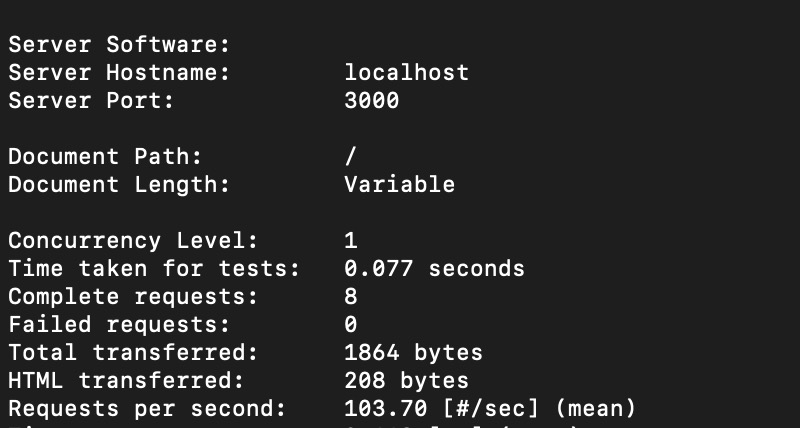 1 Concurrent user and 8 request in 1 second with clustered express HTTP API server
as expected, each CPU (total 8 core or equivalent to 8 cluster) is serving one requests because nodeJS cluster is working using round-robin process execution principle.
Multi clusters is slower than single cluster?
Below are the performance benchmark for 8 requests performed by one concurrent user.
8 Clusters performance
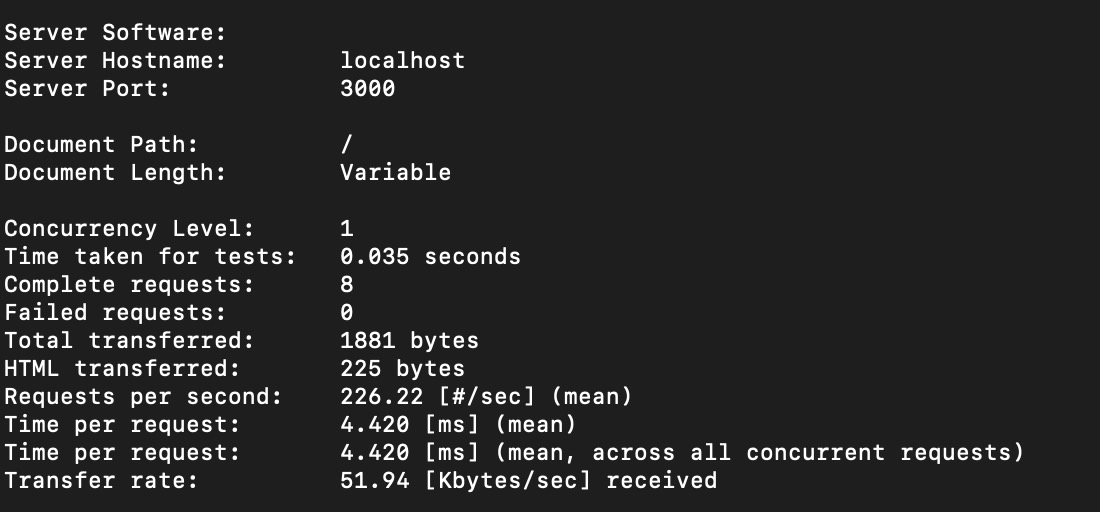 8 express node cluster with 1 concurrent user
1 Clusters performance
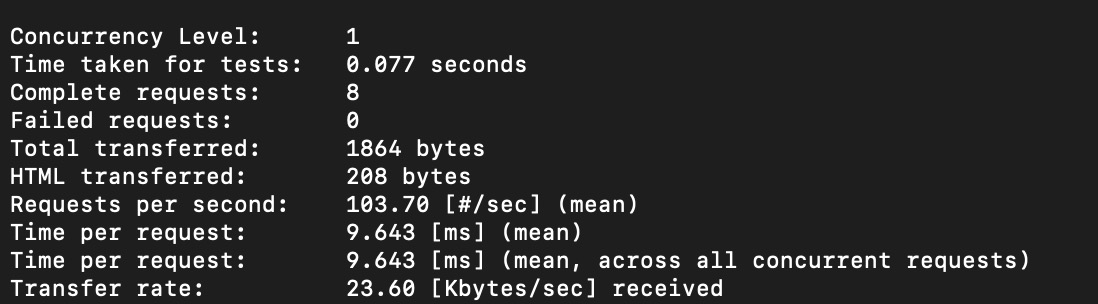 1 express node cluster with 1 concurrent user
Single cluster is only faster when the throughput is low as it doesnt have to utilize the memory to perform the round-robin orchestration and managing multiple cluster which cause performance overhead.
In contradictive, the table is turned upside down when when more request and more concurrent user is added on the benchmark scenario.
Scenario: 10K requests with 50 concurrent users
8 Clusters performance (with logging)
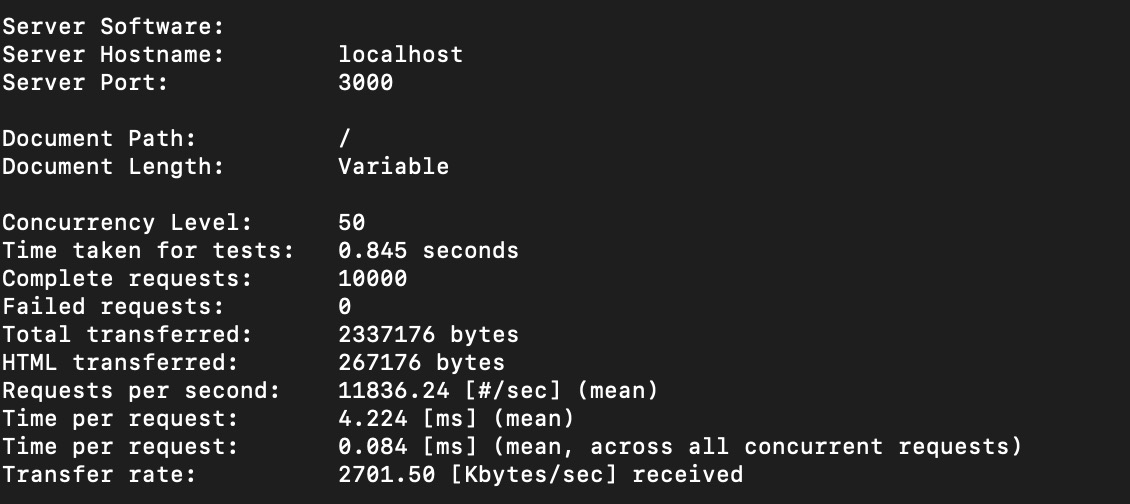 8 express nodes cluster with 50 concurrent user and 10K requests, with console logging
1 Clusters performance
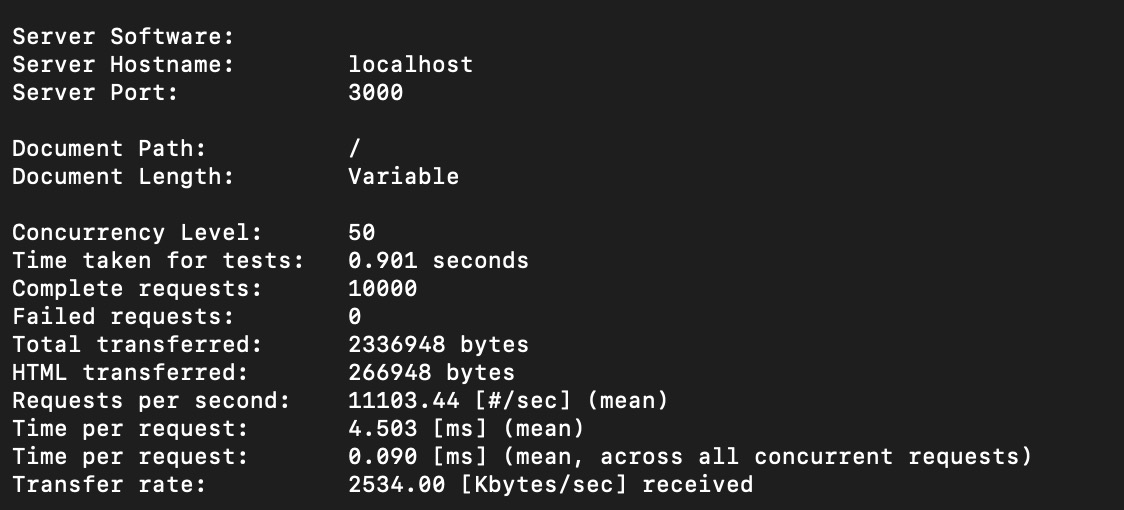 1 express nodes cluster with 50 concurrent user and 10K requests, with console logging
8 Clusters performance (without logging)
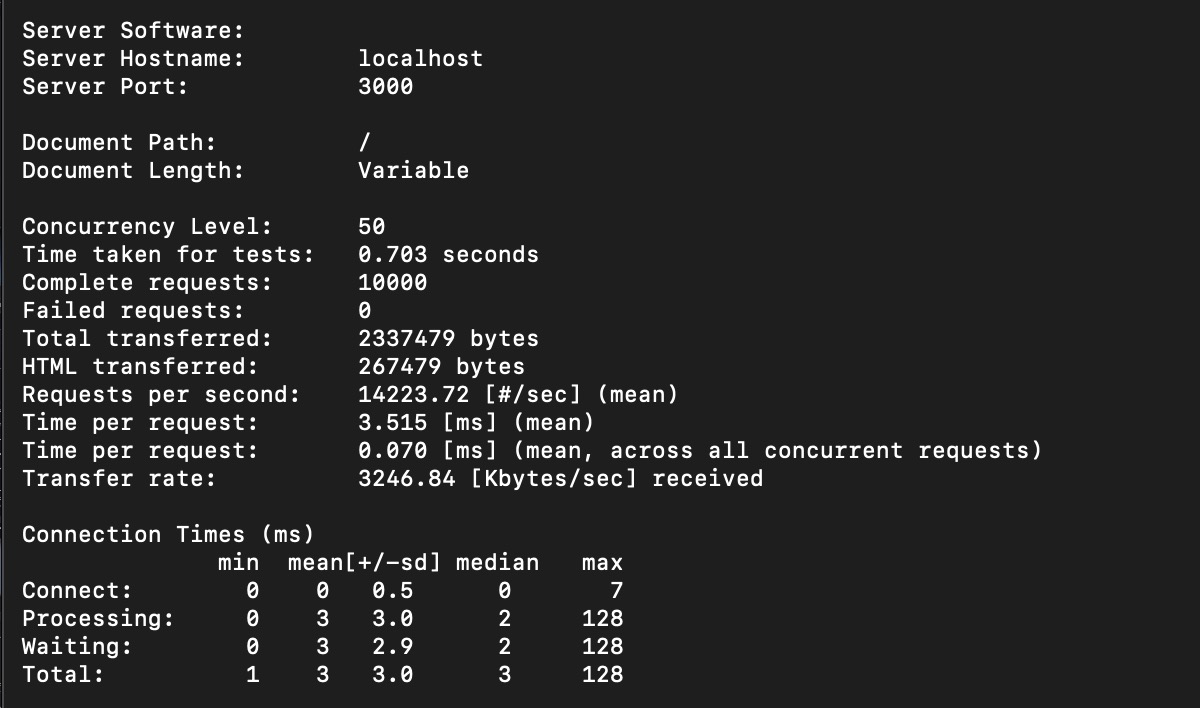 8 express nodes cluster with 50 concurrent user and 10K requests, no console logging
Now, the multi clustered express based API is faster than single clustered express based API.
| Config | Response Time | Total TPS Achieved |
|---|---|---|
| 8 Cluster with logging | 0.8 second (800ms) | 1.18K |
| 1 Cluster with logging | 0.9 second (900ms) | 1.11K |
| 8 Cluster wihtout logging | 0.7 second (700ms) | 1.42K |
Conclusion
Distributed computing through multi cluster implementation on NodeJS scales better on higher throughput.
— More CPU (vertically scaled) suppose to increase the performance (reduced lantency and increased throughput)
Combining nodeJS cluster with horizontal scaling setup (load balancer+multiple server instances) will enable NodeJS based API server to serve high throughput requests.