
User Onboarding Definition
User onboarding is a series of process to register user information to the system database along side with their preffered login method and credentials. The most popular login method is SSO (single sign on) using social media account such as gmail, facebook, instagram or X. Many people prefer that method because of the quick process. They just need to select their social media account and all of the needed personnal information will be automatically retrieved during the user onboarding process.
Depending on the type of the digital product, user onboarding is an essential steps before user can use the product. For example, on banking system, user can’t use the mobile banking unless they have been registered on the database because account number is required. In otherhand, digital product like news platform, blog, forum not require registration for the user to view the content because they need as much traffic as possible to sell the article. Putting up onboarding as pre-requisite will hinder the user to view the content/article.
The Dilemma of User Onboarding Process for Potential Customer
Complex user onboarding process is a nightmare for the sales and marketing team. Based on start up research journal study, 70% of users will abandom their product trial attempt if the onboarding process take longer than 20 minutes. Imagine filling up a super long registration form with complicated rule such as image must be less than 25 kb, middle name must be filled or asking for too personal information like birth date or birth place. Such experience must be a nightmare for majority of users unless its government owned platform for administration purposes.
Nowdays, most digital product simplify and speedup their onboarding process by incorporating social media SSO (single single on) authentication method.
However, even SSO is also introducing new dilemma. What if the user prefer to have the highest degree of anonimity? sure that they can just create alternative email and use that for the SSO. But the SSO provider still track the login attempt, login history to that digital products.
Thus, conventional user onboarding using email and password (not SSO) is still needed in modern digital world for 100% anonimyty.
Type of User Boarding Journey
There are at least three user onboarding journey on that commonly used in modern digital product such as:
-
SSO (Single sign on) - User will be login using their social media or email account and the digital product will automatically retrieve the neccesarry personnal information (usually only the email addresses). SSO is the fastest onboarding process.
-
OTP (One time password) - User will input their email or phone number (usually a phone number, as email login already catered under SSO method). The digital product/service provider will send out and OTP including with onboarding links.
-
Manual registration - User will need to fillup a form including their email addresses, username and password. Due to the manual data input, this method will take the longest time compared to other user onboarding type.
Each of user onboarding journey has its own advatanges and disadvantages. It is recommended to have all of these three onboarding scenario to increase the chance to get convert a guest into actual user as they can choose their own preferred onboarding process.
For gen-Z who prefer simplicity and speed will probably use SSO method. While, millenials (gen-X) or boomers who has concern with their anonimity will probably choose thrid method (manual registration).
Manual User Onboarding Process Flow
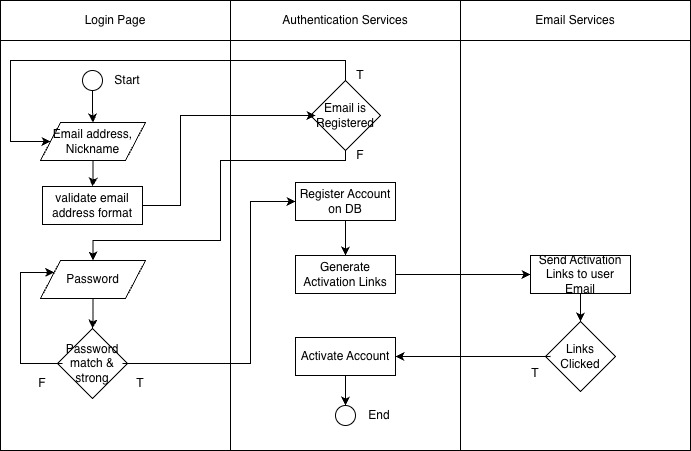 Manual user onboarding using username and password swimlane diagram
Below is the manual user onboarding process with minimum required personal data required.
- Open up user registration page
- Input email address
- System will validate if the email format is valid
- System will validate if the email has been registered or not
- Input nicknames (for more personalization, optional)
- Input password
- Verify the password by asking the user to re-input the password
- Ensure the password are match
- Check password strength
- Send out account activation email
- User click the link on their email to activate their account
- Done
ERD Adjustment to Cater Manual User Onboarding Journey
the ERD (Entity relationship diagram) need to be adjusted to cater user information and as well their login credentials.
User account credentials details like email and password need to be stored on the databases. No need to worry about security as long as the the stored password is hashed with salt. Assuming the database is using RDBMS, such credentials must be separated from the user table given following conditions:
- one user can have multiple login method (for future proof). Say user A can login using email and password as well as using SSO.
- User unqiue identifier will be determined by email.
- Same email can be used for SSO (as long as the SSO provider acknowledge that email address) and username+password login
- Single account id for both email (incase the email is valid for SSO and username+password login)
above conditions can be modelled through following logical ERD.
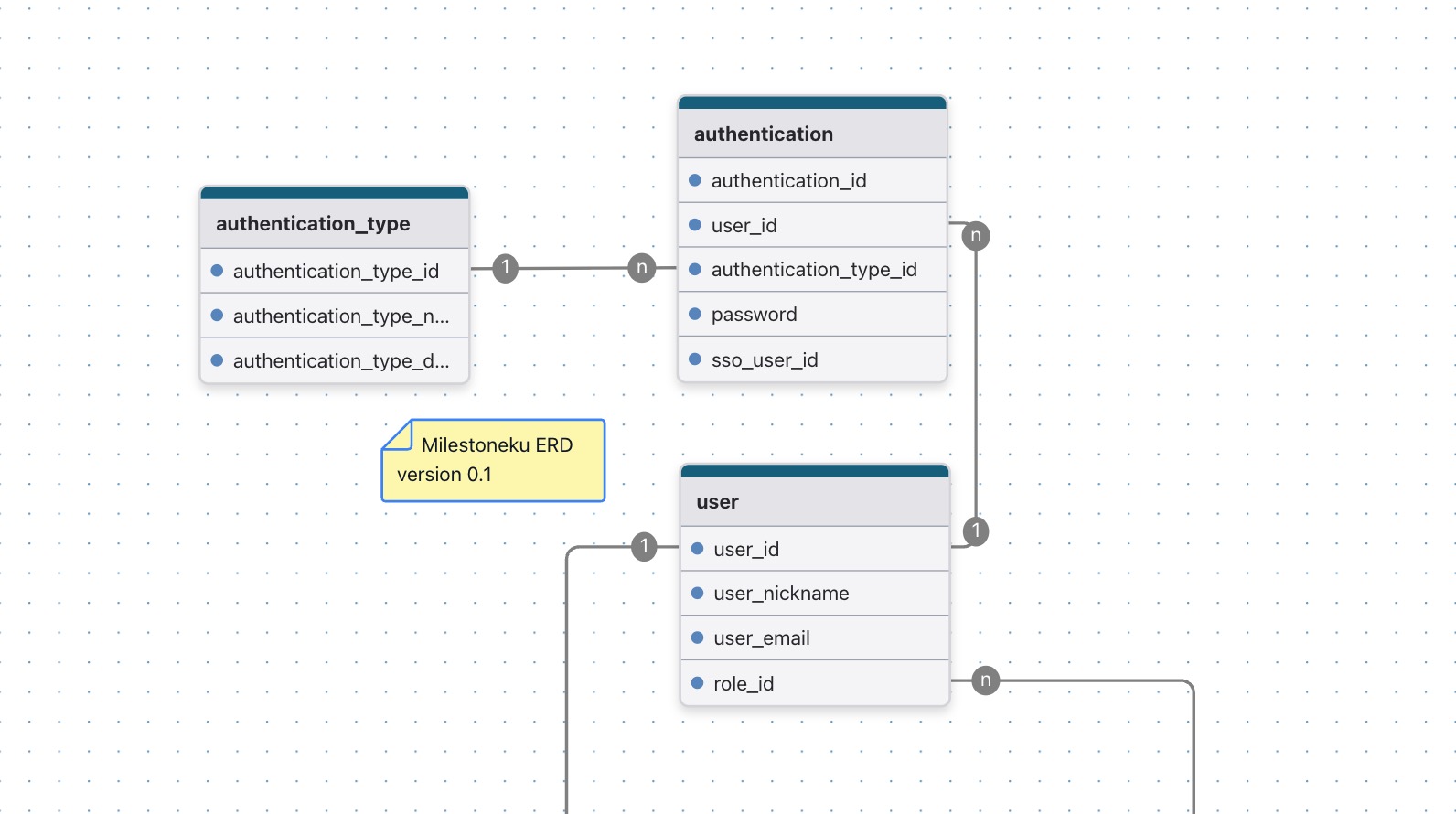 high level logical ERD for manual user onboarding using username and password
Authentication table will be an intermediary table between user and authentication_type as they have many to many relationship / cardinality. Password and sso_id will be nullable because one email can have more than one authentication_type. For example, user A is login only using SSO, means the password will be null and the sso_id will be filled. Another scenario where user B login usign both method (SSO and password), meaning the authentication.password and authentication.sso field for that particular user id will be both filled up.