Why a battery simulation is needed?
Model definition -> Environment and experiment definition -> Simulation -> Insight -> Well prepared Battery Design
Producing a battery will cost some money. a bad design or unfit design of battery may ended up in losing money. Hence, it is really important to perform simulation before actual design to prevent unfit battery. Each battery will be designed based on specific purpose and condiition. Simulation will help to simualte the battery behavior during specific environment/test and researcher can use the simulation result to prepare the actual design design.
Pybamm as Battery Simulation Tools
Currently there is one growing open-source python package that specifically function to simulate a battery. The package name is pybamm. Its a tools to simulate battery using mathematical approach.
Pybamm also has built in integrated data science package like sciPy, numPy, etc.
Based on their testimonies, pybamm is used by battery researcher for educational or industrial purposes. Since the code is open source (available to the public), all researcher over the world can help to enhance the package.
Installing PyBamm.
Pybamm is python package, its advised to use specific python version : 3.12.x. Newer version of python might not be able to run pybam as its require lower version of scipy that can only run under python 3.11.x or 3.12.x
Creating python package for PyBam using MiniConda
create a new project using python 3.12 or 3.11 with MiniConda/AnaConda. used MiniConda so all the installed package can be fully defined from scatch. Anaconda has prebuilt data science packge (tensorflow, numpy, etc). MiniConda is more streamlined.
conda create --name sdbms-pybamm python=3.11
if project creation is success, it will produce following folder skeleton.
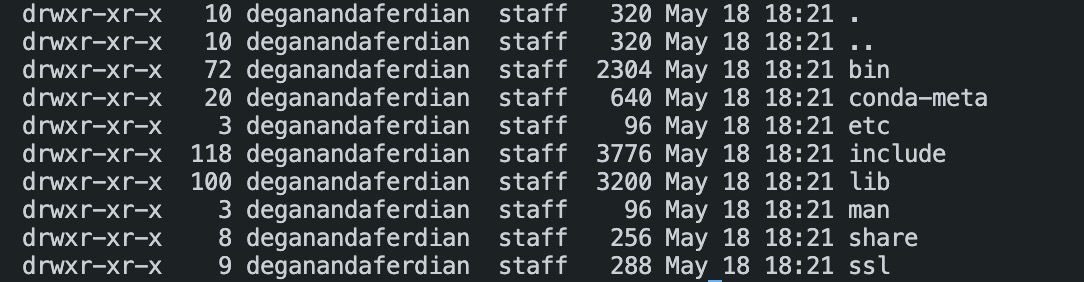
active the miniconda virtual environment
conda activate <project_name>
Install pre-requisite package
Apart from pybamm itself, other python library will be used
- Pybamm
- Numpy
- Jupyterlab
- SciPy
- Pandas
Install jupyterlab
its better to use jupyterlab so that notebook can be used (.ipynb) executing data science project. Every procedure can be documented, listed and arranged properly. It gave a flexible working environment compared to normal python script.
conda install -c conda-forge jupyterlab
ensure the jupyterlab installed at the conda environment.
conda list --name <project_name> | grep jupyter
Install Pybamm, Numpy and Skipy
below command is used to install Numpy, SciPy and pandas
conda install -c conda-forge scipy numpy pandas
ensore those package installed
conda list --name <project_name> | grep scipy
conda list --name <project_name> | grep numpy
conda list --name <project_name> | grep pandas
Install ipywidget for the plot
execute following command
conda install -c conda-forge ipywidgets
validate
conda list --name <project_name> | grep ipywidgets
Install plotly to enable the plot slider
execute following command
conda install -c conda-forge plotly
validate
conda list --name <project_name> | grep ipywidgets
add to the cell
!jupyter nbextension enable --py widgetsnbextension
execute via terminal
jupyter labextension install @jupyter-widgets/jupyterlab-manager
Generate environment.py
execute below script to generate environment details (for future installation by different people)
conda env export --from-history > environment.yml
Full Code of Experiment
Code is written using ipynb, all instruction, available model, input model param, model output are written on the code.
SDBMS Battery Simulation
Initiating PyBamm
import pybamm
from pybamm import BaseModel
from pprint import pprint
Choose Battery Chemical & Model
## [1] Doyle Fuller newman [2] Single Particle Model (SPM) [3] Single Particle Model with Electrolyte (SPMe)
availableModel = ["DFN","SPM", "SPME"]
selectedModel = availableModel[0]
model : BaseModel

match selectedModel:
    case "DFN":
        model : BaseModel = pybamm.lithium_ion.DFN()
    case "SPM":
        model : BaseModel = pybamm.lithium_ion.SPM()
    case "SPME":
        model : BaseModel = pybamm.lithium_ion.SPMe()
Print Available Model Input Parameter. Input Parameter = predefined config / parameter for physical, chemical and electrochemical properties of battery.
modelInputParameters = list(pybamm.parameter_sets)
pprint(modelInputParameters)
Display Selected Model input parameter value
selectedInputParameter =  pybamm.ParameterValues("Chen2020")
## DFN => Chen2020, Ai2020. SPME = Marquis2019, SPM = Marquis2019
pprint(selectedInputParameter)
Print Available Model Output Parameter
availableOutputModelVariable = model.variable_names()
pprint(availableOutputModelVariable)
Available Instructions
- “Discharge at 1C for 0.5 hours”,
- “Discharge at C/20 for 0.5 hours”,
- “Charge at 0.5 C for 45 minutes”,
- “Discharge at 1 A for 90 seconds”,
- “Charge at 200mA for 45 minutes”,
- “Discharge at 1 W for 0.5 hours”,
- “Charge at 200 mW for 45 minutes”,
- “Rest for 10 minutes”,
- “Hold at 1 V for 20 seconds”,
- “Charge at 1 C until 4.1V”,
- “Hold at 4.1 V until 50 mA”,
- #”Hold at 3V until C/50”,
Run Simulation
experiment = pybamm.Experiment(
    [
        (
            "Discharge at C/10 for 10 hours or until 3.3 V",
            "Rest for 1 hour",
            "Charge at 1 A until 4.1 V",
            "Hold at 4.1 V until 50 mA",
            "Rest for 1 hour",
        )
    ]
)
sim = pybamm.Simulation(model, experiment=experiment, parameter_values=selectedInputParameter)
startDuration = 0
endDuration = 3600 #in second
sim.solve([startDuration, endDuration])
Visualize
pybamm.dynamic_plot(sim)
Export Plot to HTML (for slider feature)
Custom Plot with Selected Model Result Parameter
output_variables = ["Time [min]", "Electrolyte concentration [mol.m-3]", "Voltage [V]"]
sim.plot(output_variables=output_variables)
Plot voltage component
sim.plot_voltage_components()
pprint("end")
Github Repo
repository for those experinment can be found here:
https://github.com/deganandapriyambada/battery-simulation-pybamm/blob/master/notebook/battery.simulation.ipynb
Steps to replicate
Installation Method
conda create --name <project_name> python=3.11
conda env create -f environment.yml
conda activate <project_name>